Analytics tools group visits by UTM parameters, so a typo or a broken link costs you data. Free1APK UTM Link Builder adds the parameters with correct encoding and keeps everything else in your link. It never visits the link.
Build a link step by step
Step 1 Enter the destination URL
Use a full http:// or https:// address. Existing query parameters and a #fragment are kept.
Step 2 Fill in source, medium and campaign
Campaign source, medium and name are required; term and content are optional and left out when empty. Spaces and special characters are encoded for you.
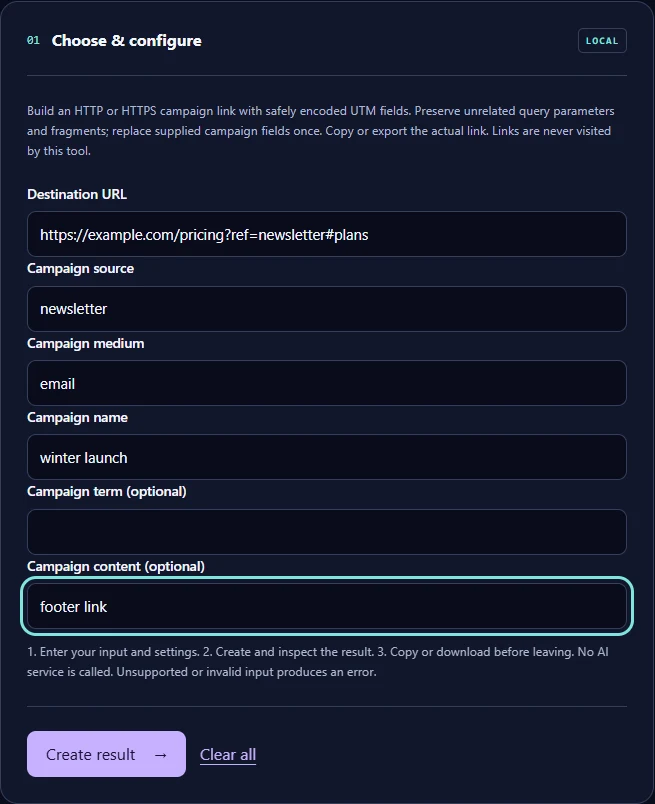
Step 3 Select Create result and copy the link
Check the finished link, then copy it or download it as a text file.
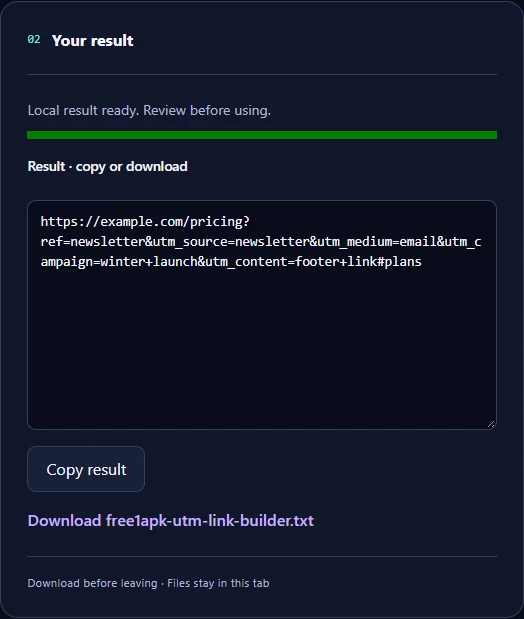
The real example
Input: https://example.com/pricing?ref=newsletter#plans with source “newsletter”, medium “email”, campaign “winter launch” and content “footer link”. Downloaded result: https://example.com/pricing?ref=newsletter&utm_source=newsletter&utm_medium=email&utm_campaign=winter+launch&utm_content=footer+link#plans. The empty term was not added.
Good habits
Use the same lowercase spelling for each source and medium across campaigns, or your reports will split them. If the link already has a UTM field you fill in, it is replaced once rather than duplicated. Test the final link yourself before sharing; the tool does not open it.
Frequently asked questions
Why does a space become “+”? That is the standard form encoding for query values, and analytics tools read it as a space. Can I use it for app links? Only HTTP and HTTPS links are accepted. Is anything tracked by Free1APK? No; the link is built in your browser.