Text copied from emails, PDFs or chat tools often carries stray spaces, tabs, blank lines and repeats. Free1APK Text Cleaner applies simple, predictable rules to pasted text or one UTF-8 TXT file and shows the result before you download it.
Clean text step by step
Step 1 Paste the text or choose a TXT file
Paste into “Text to clean” or switch to a UTF-8 TXT file. Up to 20,000 lines per run.
Step 2 Choose the cleanup rules
Trimming each line and collapsing tabs and horizontal spaces are on by default. Turn on “Remove blank lines” and “Remove duplicate lines · keep the first occurrence” when you need them. Case conversion and the line-ending format (LF or CRLF) are optional.
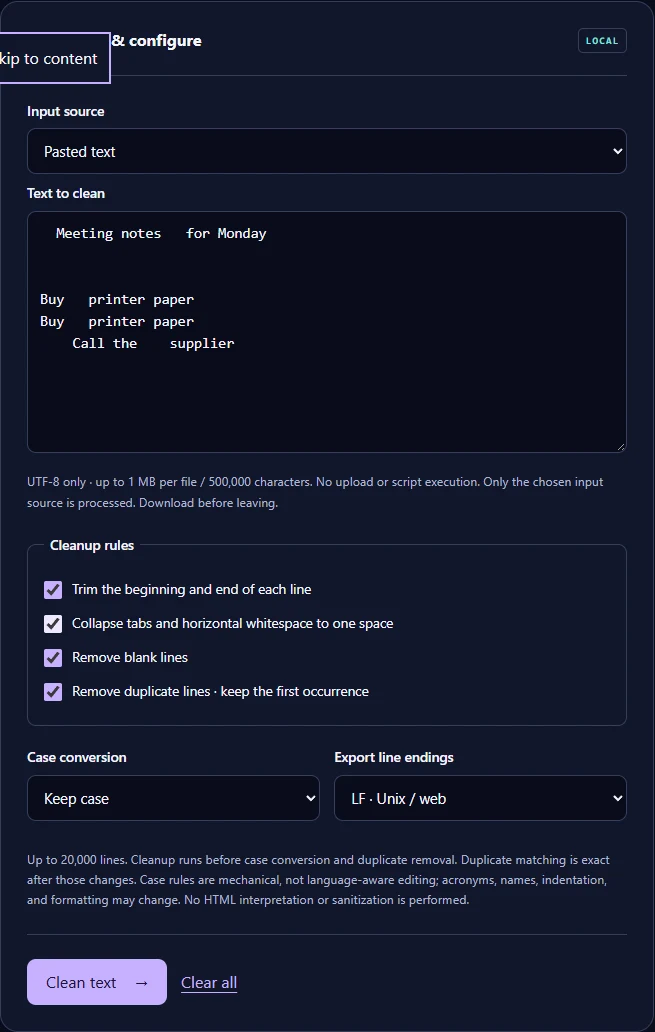
Step 3 Select Clean text
The summary shows how many lines and characters remain. Read the preview before copying or downloading.
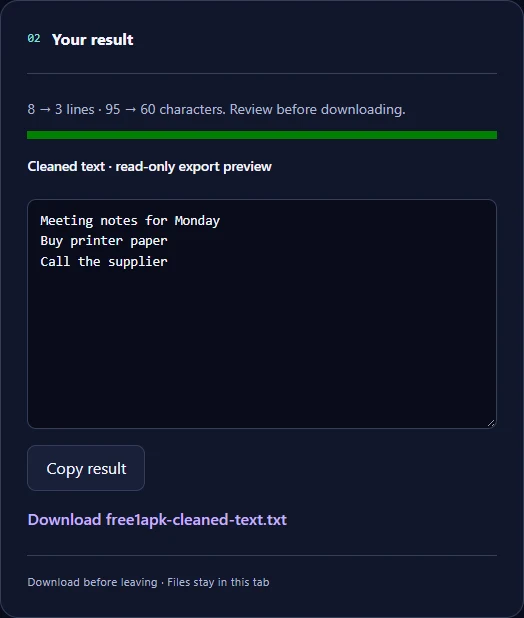
The real example
The 95-byte sample became a 60-byte file with three lines: “Meeting notes for Monday”, “Buy printer paper” and “Call the supplier”.
What the rules do not do
Rules run in a fixed order: cleanup first, then case conversion and duplicate removal. Duplicate matching is exact after those changes. Case rules are mechanical and can change names or acronyms. The tool does not interpret or sanitize HTML.
Frequently asked questions
Does it fix spelling or grammar? No. Will indentation be kept? Trimming removes it; turn trimming off to keep it. Which line ending should I choose? LF for most tools and websites, CRLF when a Windows program requires it.
Remove repeated rows from CSV data with the CSV Duplicate Cleaner