When a page or a message needs several lighter images, compressing them one by one is slow. Free1APK Bulk Image Compressor re-encodes up to ten images in sequence in your browser and reports the real size of each result.
Compress a batch step by step
Step 1 Choose up to ten images
Select JPG, PNG or WebP files: up to 20 MB each and 50 MB together.
Step 2 Choose the output format and quality
WebP at quality 80 is a reasonable starting point. PNG is lossless and ignores quality; JPEG fills transparent areas with white.
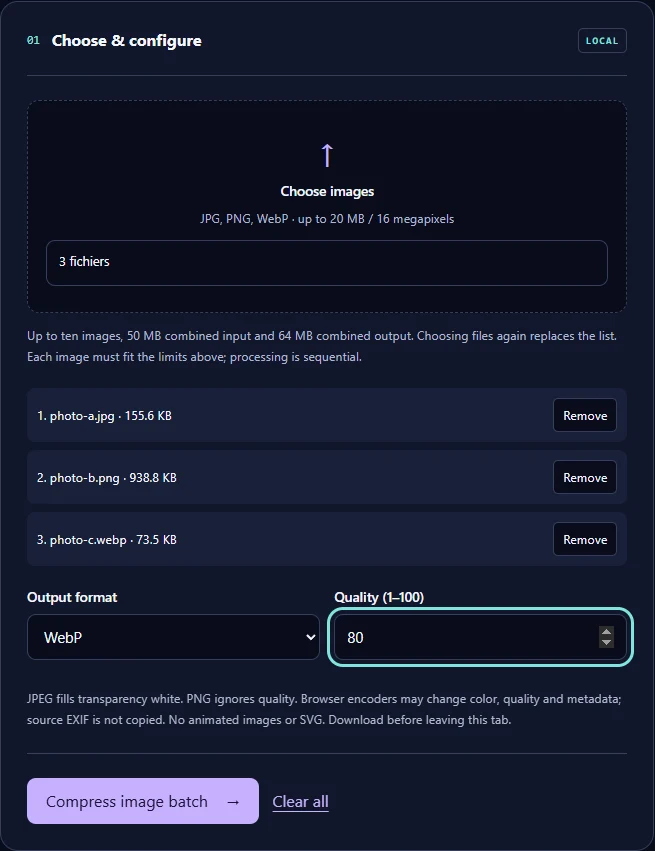
Step 3 Select Compress image batch and download
Download each output and the JSON size report. Compare sizes before you replace your originals.
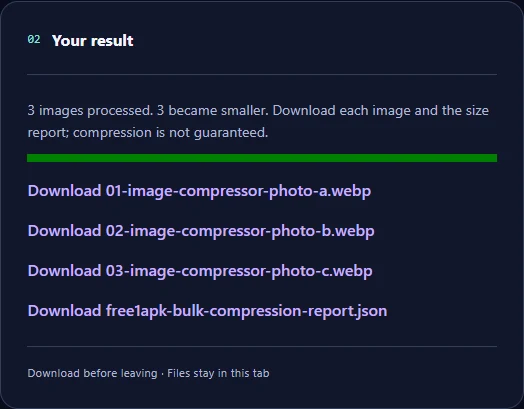
The real example
Measured in this run: photo-a.jpg: 155.6 KB → 36.5 KB; photo-b.png: 938.8 KB → 36.5 KB; photo-c.webp: 73.5 KB → 29.9 KB. In total 1,167.9 KB became 102.9 KB. These synthetic samples are not a prediction for your images.
Why a file can get larger
Re-encoding an already well-compressed image, or switching to a less suitable format, can increase its size. The report marks every file as smaller or not, so check it. Image dimensions are not changed; use the Image Resizer for that.
Frequently asked questions
Are my images uploaded? No; every file is processed in your browser, one after another. Can I compress more than ten? Run another batch. Is metadata kept? Re-encoding in the browser does not copy most source metadata, but check if that matters to you.