A website needs the same icon in several sizes. Free1APK Favicon Generator creates them from one JPG, PNG or WebP image in your browser: six PNG sizes, an ICO file and a short HTML snippet.
Create favicons step by step
Step 1 Choose one image
Select a still JPG, PNG or WebP image, up to 20 MB and 16 megapixels. A simple shape with strong contrast stays readable at 16 pixels.
Step 2 Choose the square layout
Center crop fills the square and may cut the edges of a wide image. Pad keeps the whole image and adds space around it.
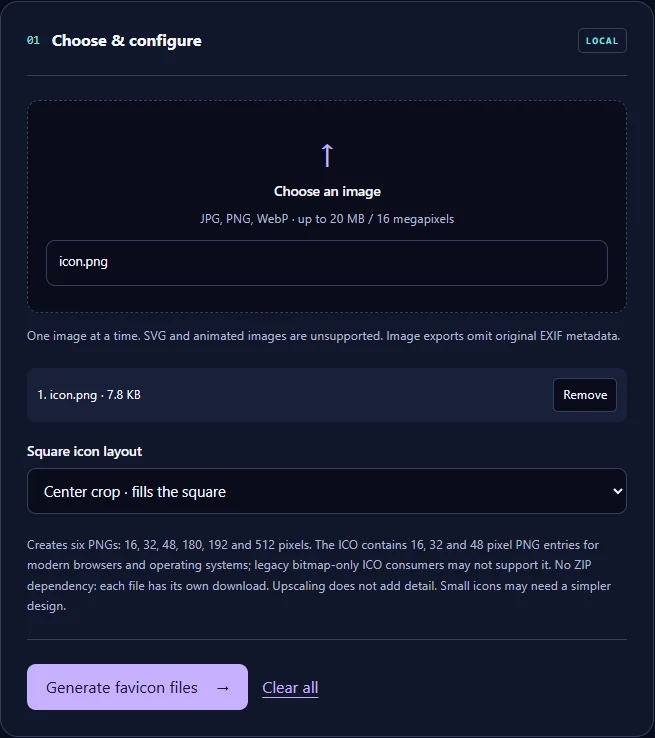
Step 3 Select Generate favicon files and download each file
Download the PNG sizes, the ICO and the link snippet one by one.
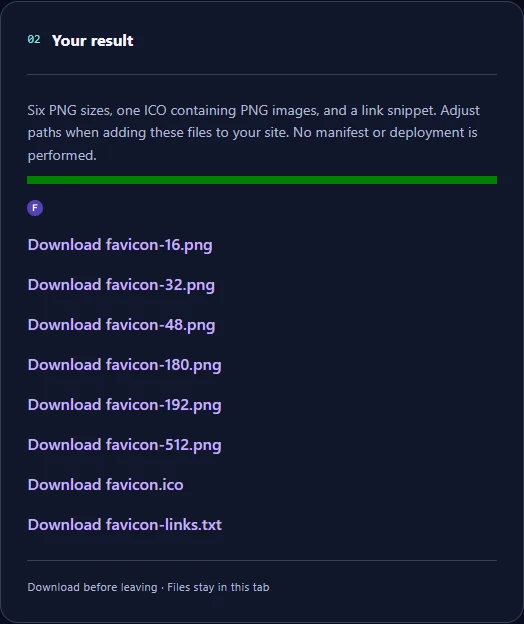
The real example
From the 7960-byte sample the tool produced six PNG files, a 1171-byte favicon.ico containing PNG images and favicon-links.txt with three link tags for the ICO, the 32-pixel PNG and the 180-pixel Apple touch icon.
After downloading
The snippet uses relative file names; adjust the paths to where you upload the files. The tool does not create a web manifest or publish anything. Check the 16 and 32 pixel versions at their real size: fine detail usually disappears.
Frequently asked questions
Is the image uploaded? No; resizing happens in your browser. Which sizes do browsers use? Usually the ICO or the 32-pixel PNG in tabs and the 180-pixel PNG on Apple devices. Can I use an SVG? No; use a JPG, PNG or WebP source.
Crop your logo to an exact square first with the Precision Image Cropper