This walkthrough shows the real Free1APK base64-text-codec tool using an original public-safe demonstration string. The interactive tool is embedded below. No private text or user document was used.
Step-by-Step Browser Walkthrough
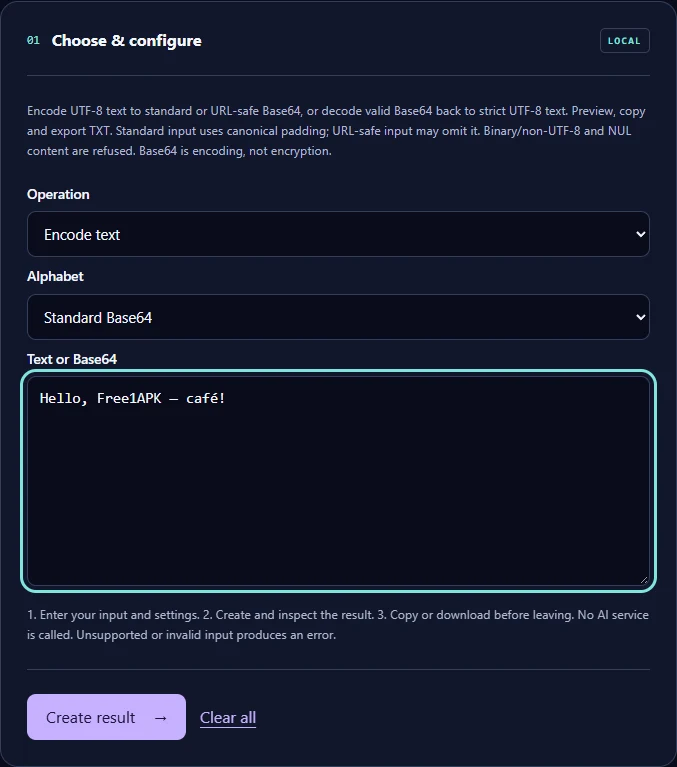
Step 1 Open the Local Tool
Find the tool embedded at the end of the article or open its standalone Free1APK page. Processing happens in your browser, not in a paid API.
Step 2 Enter Exact Settings
Choose Encode text and Standard Base64. Paste the sample into the Text or Base64 field. Standard Base64 uses + and / in its alphabet and canonical = padding when needed.
Step 3 Run and Download TXT
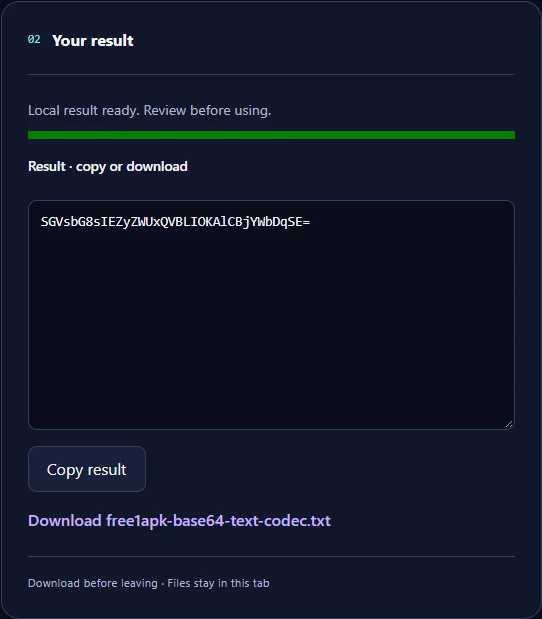
Select Create result, inspect the on-screen result and download the UTF-8 TXT file. The recorded Chrome download was checked against the expected exact output bytes.
Measured Input and Real Download
Recorded input (26 UTF-8 bytes): Hello, Free1APK — café!
Exact encoded TXT output (36 UTF-8 bytes): SGVsbG8sIEZyZWUxQVBLIOKAlCBjYWbDqSE=
The downloaded result was independently checked byte-for-byte in local Chrome; SHA-256: 9e2928b460970fdb59d52a4a7dc87ef1aaf96ba0eefcf7eeb0f38242f9ae89d5. This checksum documents only this one owned test sample, not all possible inputs.
What This Conversion Means—and Does Not Mean
The UTF-8 bytes of this example are encoded into ASCII text. A reader can reverse Base64; it is not encryption or a way to keep passwords private. URL-safe Base64 uses a different alphabet and can omit padding.
Frequently Asked Questions
Will Base64 protect a password? No. It is reversible encoding, not encryption. Can it carry accented characters? Yes, when UTF-8 bytes are encoded first. Can I decode any binary file as text? No; this tool rejects bytes that are not valid UTF-8.
Try the Actual Interactive Tool
Use the embedded Free1APK tool below to repeat the steps with your own allowed text. Confirm character handling and downloaded output before use.