A palette taken from an image is a quick starting point for a design or a slide deck. Free1APK Color Palette Extractor samples a still image in your browser and lists its main colors as HEX and RGB values with their approximate share.
Extract a palette step by step
Step 1 Choose a still image
Select a JPG, PNG or WebP image up to 20 MB. Transparent pixels are ignored.
Step 2 Choose how many colors
Enter between 2 and 12 palette colors. Fewer colors give broader groups.
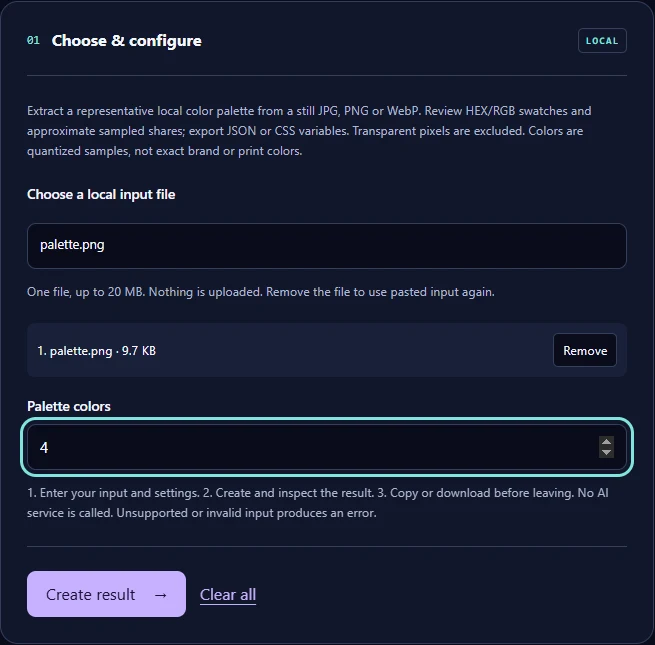
Step 3 Select Create result and export
Review the swatches, then download the JSON or the CSS variables file.
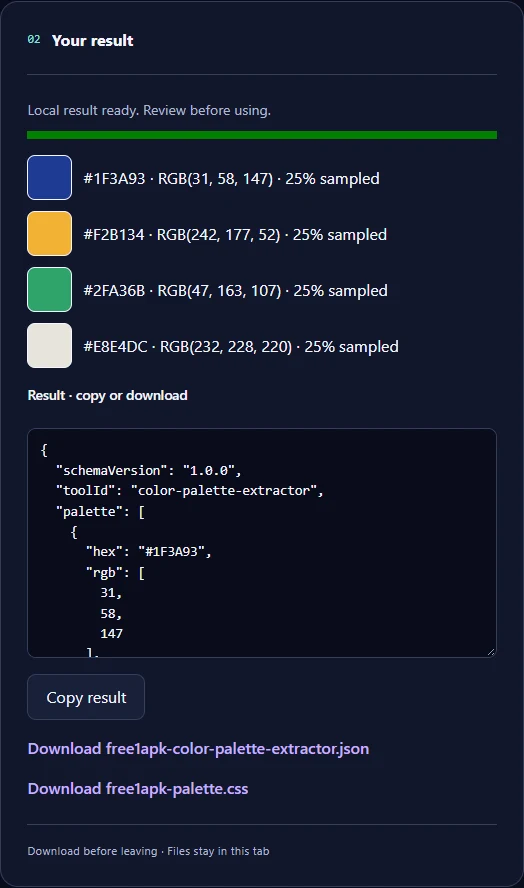
The real example
The sample was drawn with four equal blocks. The tool returned #1F3A93, #F2B134, #2FA36B, #E8E4DC, each at 25% of the sampled pixels, and the CSS file declares them as --palette-1 to --palette-4.
What the palette is and is not
Colors are quantized samples of a reduced copy of the image, so photos give approximate groups rather than exact pixel values. They are not official brand or print colors: check those against the brand guide or a print proof.
Frequently asked questions
Is the image uploaded? No. Why do shares not add up to 100%? Colors outside the selected swatches are not counted. Can I use the CSS directly? Yes; rename the variables to fit your project.
Create site icons in your new colors with the Favicon Generator