Repeated rows distort reports, imports and counts. Free1APK CSV Duplicate Cleaner removes repeated data rows locally and keeps the first occurrence. It does not decide which version of a record is best; check that before exporting.
Remove duplicates step by step
Step 1 Paste the CSV or choose a file
Paste comma-separated data into “CSV data” or choose one CSV/TXT file. Quoted values, including commas and doubled quotes inside them, are parsed correctly.
Step 2 Choose how rows are compared
Keep “First row contains unique headers” on when the first row has column names. Leave “Match column numbers” empty to compare whole rows, or enter numbers such as 1,3 to compare only those columns. Trimming and ignoring case change the comparison only, not the exported values.
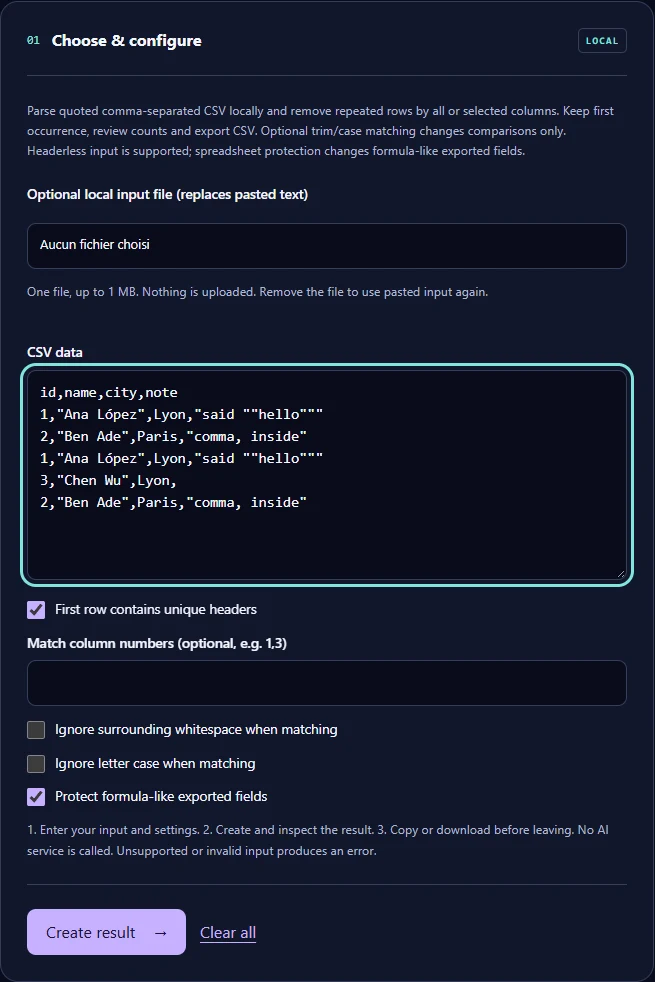
Step 3 Select Create result and check the counts
Read the summary line before downloading: it states how many rows were read, removed and kept.
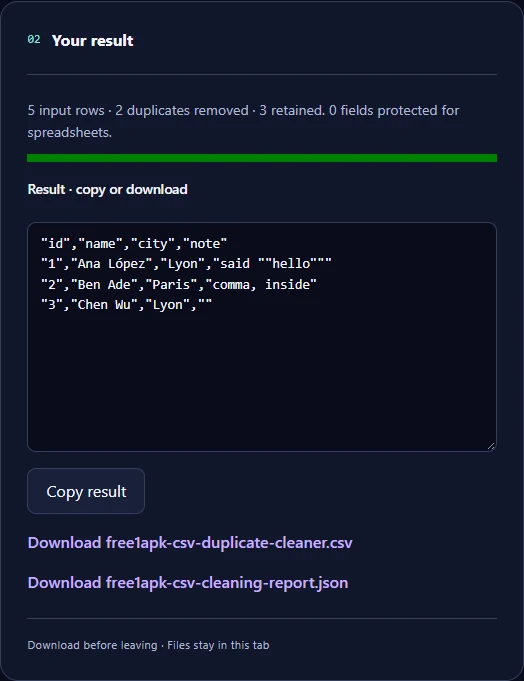
The real example
The sample had 5 data rows, two of them exact repeats with quoted text such as "said ""hello""" and "comma, inside". The tool kept 3 rows, removed 2 and protected 0 fields. The exported CSV quotes every field.
Limits and things to check
Up to 1 MB, 5,000 rows and 100 columns per run. The first occurrence of each repeat is kept. Comparing selected columns can remove rows whose other columns differ, so review those rows first. Spreadsheet protection adds an apostrophe to formula-like fields in the export; turn it off only for data that never opens in a spreadsheet.
Frequently asked questions
Does it remove duplicate columns? No, only repeated rows. Is the data uploaded? No; parsing happens in your browser. Can it handle a file without headers? Yes; turn off the header option.
Clean messy plain text before importing it with the Text Cleaner