A download can have the right name and extension but still contain different bytes. A checksum lets you detect that. Free1APK File Hash Calculator reads one file in your browser, calculates a cryptographic digest and compares it with a checksum you already trust.
Verify a checksum step by step
Step 1 Choose the file
Select one file of any type, up to 20 MB. The file is read as bytes and never opened or run. Empty files are allowed.
Step 2 Choose the algorithm and paste the expected digest
Pick the same algorithm the publisher used (SHA-256, SHA-384 or SHA-512) and paste their hexadecimal checksum into “Expected hexadecimal digest (optional)”. For SHA-256 that is 64 hexadecimal characters.
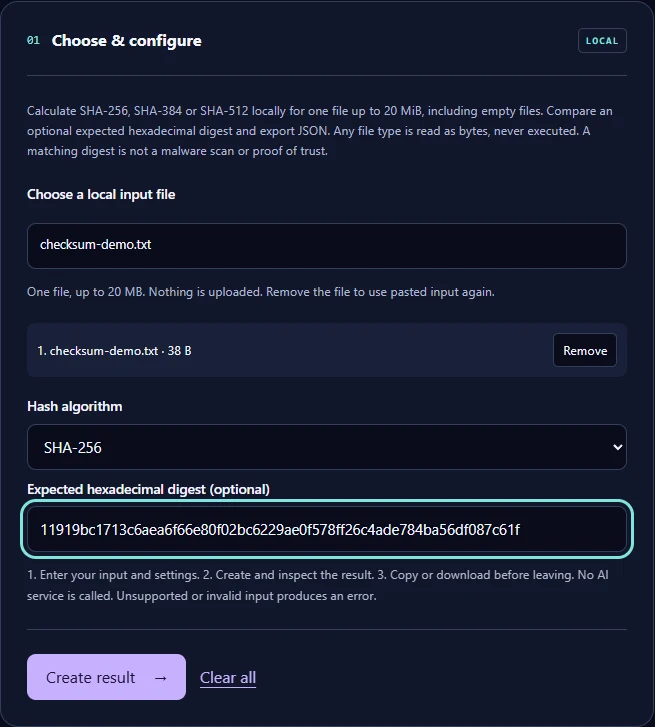
Step 3 Select Create result
The tool shows the digest and whether it matches, and offers a JSON report to download.
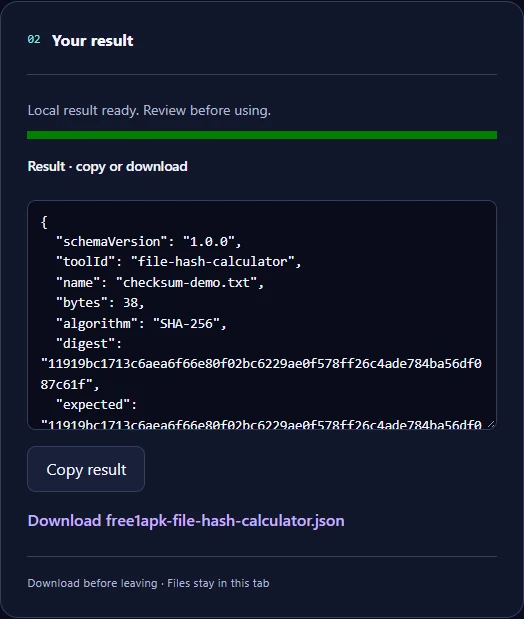
The real example
The sample was a 38-byte text file created for this guide. Its SHA-256 digest is 11919bc1713c6aea6f66e80f02bc6229ae0f578ff26c4ade784ba56df087c61f. The downloaded JSON report shows the same digest and "matchesExpected": true.
What a matching checksum does not prove
A match means the bytes are identical to the file the checksum describes. It is not a malware scan and not a signature check, and it says nothing about whether the source itself is trustworthy. Always get the checksum from the official source, over HTTPS, and not from the same place you got a suspicious file.
Frequently asked questions
Is my file uploaded? No; the digest is calculated in your browser. Which algorithm should I use? The one the publisher lists; a SHA-256 checksum cannot be compared with a SHA-512 one. Why does a single changed byte give a completely different digest? That is how cryptographic hash functions work, which is why they detect any change.
Also useful: build a campaign link with the UTM Link Builder